Menu
×
Tutorials Ms Word Tutorial Ms Excel Tutorial Ms PowerPoint Tutorial C Language Tutorial C++ Tutorial C Sharp Tutorial Visual Basic Tutorial HTML Tutorial CSS Tutorial JavaScript Tutorial WordPress Tutorial
     ❯   

ADVERTISEMENT

Author name: itsolzone

Bulleted List

Bulleted list

Introduction When it comes to organizing information in your documents, bulleted lists are a powerful tool. They help break down complex ideas into digestible points, making content more reader-friendly. Creating a Basic Bulleted List To create a basic bulleted list in Microsoft Word:
Define New Bullet list, list manually, Manual List, Number List, Bulleted List, ordered List, unordered List

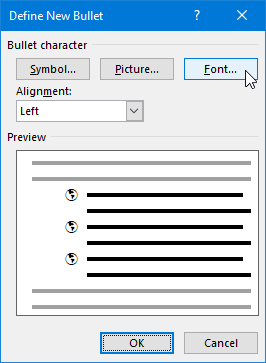
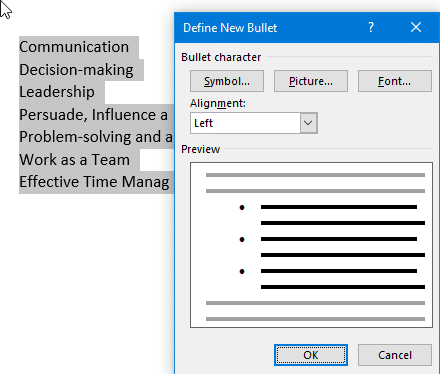
Define a new bullet

Defining a New Bullet Symbol Let’s see how we can change the appearance of the bullet, as follows: For illustration purposes, we have used Webdings as our bullet font in the previous screenshot.

list manually, Manual List, Number List, Bulleted List, ordered List, unordered List

Manual List

There are various ways to set up a bulleted or numbered list, either by typing the text first and then converting the list into a specific list type or by choosing the list type first and then beginning typing.

Microsoft Word text alignment , Left, Right, Center and Justify

Text alignment

Microsfot word Left, Right, Center, and Justify text alignment. The alignment options are located under the Paragraph group, under the Home Tab as shown. After applying each of the alignment types, you will see the following result: Left Alignment (By Default) Center Alignment Right Alignment Justify Alignment

Microsoft word font dialog box

Font Attributes

Microsoft Word provides numerous options to customize the appearance of your text, allowing you to create visually appealing and professional-looking documents. One of the most powerful tools for text formatting is the Font Dialog Box or Font Attributes. This feature enables you to modify font styles, sizes, colors, and effects, giving you complete control over …

Font Attributes Read More »

Ribbon Access

Ribbon Access

To allow more space to work with documents, simply fold away or minimize the ribbon. This can be achieved in more than one way:

Rulers

We use the ruler bars (vertical and horizontal) in Word 2019 to measure and set the distance between tabs, margins, the page layout, and the header and footer distances.

Microsoft Word Tabs and Groups

Tabs and Groups

Among these features are tabs and groups, which allow you to organize your documents and streamline your workflow.

title bar, Microsoft, title,

Ms Word Title Bar

The Microsoft Word title bar is located at the top of the application window and provides users with essential information and controls.

Chapter – 7 [Operating Systems (Windows)]- Notes

Q. What is an Operating System? What is its purpose? Discuss types of Operating Systems. Operating System: An operating system (OS) is a set of computer programs that manage the hardware and software resources of a computer. An operating system performs basic tasks such as: Purpose/Objectives Of Operating System: There can be many objectives of …

Chapter – 7 [Operating Systems (Windows)]- Notes Read More »

Chapter – 6 [Security, Copyright laws]- Short Questions & Answers

Understanding the Importance of Security and Copyright Laws in the Digital World. Security refers to the protection of information and systems from unauthorized access, use, disclosure, disruption, modification, or destruction. It is important to maintain security to prevent sensitive information from falling into the wrong hands, protect intellectual property, and ensure the integrity of systems …

Chapter – 6 [Security, Copyright laws]- Short Questions & Answers Read More »

Chapter – 6 [Security, Copyright laws]- MCQs and Blanks

MCQs (Multiple Choice Questions) and blanks are two types of assessment formats commonly used in educational settings. Multiple Choice Questions are a type of question that presents several options or choices for the student to select the correct answer from. The question typically begins with a stem or statement, followed by several options or choices. …

Chapter – 6 [Security, Copyright laws]- MCQs and Blanks Read More »

Chapter – 6 [Security, Copyright laws]- Notes

Q. What is a computer crime? Explain its types. Computer Crime Any crime committed using computer technology and networks are referred to as computer crime or cybercrime. Undoubtedly a criminal offense, cybercrime is sanctioned by the law. Cybercriminals create various plans and programs to attack computers and systems. There are several types of computer-related crimes. …

Chapter – 6 [Security, Copyright laws]- Notes Read More »

Chapter – 5 [Computer Architecture]-Short Questions And Answers

“Explore the fundamentals of Computer Architecture with a focus on CPU, Main Memory, I/O devices, and Secondary Storage Devices. Learn about the key components of computer systems such as Registers, Bus Interconnection, RAM, ROM, and Cache Memory. Discover the essential roles of CU and ALU and how they work together in processing data. Get familiar …

Chapter – 5 [Computer Architecture]-Short Questions And Answers Read More »

Chapter – 5 [Computer Architecture]- Notes

“Explore the fundamentals of Computer Architecture with a focus on CPU, Main Memory, I/O devices, and Secondary Storage Devices. Learn about the key components of computer systems such as Registers, Bus Interconnection, RAM, ROM, and Cache Memory. Discover the essential roles of CU and ALU and how they work together in processing data. Get familiar …

Chapter – 5 [Computer Architecture]- Notes Read More »

Chapter – 4 [Applications And Use Of Computer]-MCQs And Blanks

MCQs (Multiple Choice Questions) and blanks are two types of assessment formats commonly used in educational settings. Multiple Choice Questions are a type of question that presents several options or choices for the student to select the correct answer from. The question typically begins with a stem or statement, followed by several options or choices. …

Chapter – 4 [Applications And Use Of Computer]-MCQs And Blanks Read More »

Chapter – 4 [Applications And Use Of Computer]-Short Questions And Answers

Q. What is the use of computer in Marketing?             Marketing is the process by which goods are sold and purchased. The aim of marketing is to acquire, retain, and satisfy customers. Marketing applications help managers to develop strategies that combine the four major elements of marketing i.e. Product, Promotion, Place and Price. Q. What …

Chapter – 4 [Applications And Use Of Computer]-Short Questions And Answers Read More »

Chapter – 4 [Applications And Use Of Computer]-Notes

Q. How are computers used in the field of banks? Computer In Banks Banks use a wide range of computers to carry out regular, day-to-day operations. Computers allow banking staff to efficiently carry out transactions, process customer needs, forecast future trends, prepare internal and external reports, communicate with key participants and generate profits. Banking computers …

Chapter – 4 [Applications And Use Of Computer]-Notes Read More »

Chapter – 3 [Data Communications]- MCQs & Blanks

MCQs (Multiple Choice Questions) and blanks are two types of assessment formats commonly used in educational settings. Multiple Choice Questions are a type of question that presents several options or choices for the student to select the correct answer from. The question typically begins with a stem or statement, followed by several options or choices. …

Chapter – 3 [Data Communications]- MCQs & Blanks Read More »

Chapter – 3 [Data Communications]- Short Questions & Answers

Q. What is data communication? Ans.  Data communication is the exchange of data between two devices via some form of transmission media or Data communication transfer of data or information from one location to another is called data communication or the movement of encoded information by means of an electrical transmission system from one computer …

Chapter – 3 [Data Communications]- Short Questions & Answers Read More »

Chapter – 3 [Data Communication]-Notes

Q. What is DATA? What are the Types of DATA? Data Types of data: Text: Numeric: Image: Audio: Video: Q. What is Data Communication? What are the components of Data Communication? Data Communication: or or Components of Data Communication: There are five components of data communication. Message: Sender: Receiver: Communication channel: Encoder and Decoder: Q3. …

Chapter – 3 [Data Communication]-Notes Read More »

Chapter – 2 [Information Networks]- MCQs & Blanks

LAN. WAN, MAN, Computer Networks, Information Networks, Internet, Internet Network Choose the Correct Option: A LAN is a combination of: Network Adapter Cards                      LAN Application Software LAN Cables                                        ALL of the above A collection of computers connected together is called: Processing                                           Network Chatting                                               None Central computer in the network is called: Client                                                  …

Chapter – 2 [Information Networks]- MCQs & Blanks Read More »

Chapter – 2 [Information Networks]- Short Questions and Answers

LAN. WAN, MAN, Computer Networks, Information Networks, Internet. Q. What are the technologies involved in information networks? Ans.  Information networks or computer networks are the convergence of two technologies, Computing and Telecommunication. This convergence resulted in LAN (Local area Network), MAN (Metropolitan Area Network), WAN (Wide Area Network) and the Internet. The most popular information …

Chapter – 2 [Information Networks]- Short Questions and Answers Read More »

Chapter – 2 [Information Networks]- Notes

LAN. WAN, MAN, Computer Networks, Information Networks, Internet. Q. What are information networks? Information Networks: The main advantages and disadvantages of a computer network are Advantages Disadvantages Sharing files becomes easy. A hacker can get unauthorized access to files. Sharing of equipment becomes easy. The cost of implementing a network is high Communication between two …

Chapter – 2 [Information Networks]- Notes Read More »

Chapter – 1 [Basic Concepts Of Information Technology] – MCQs & Blanks

MCQs (Multiple Choice Questions) and blanks are two types of assessment formats commonly used in educational settings. Multiple Choice Questions are a type of question that presents several options or choices for the student to select the correct answer from. The question typically begins with a stem or statement, followed by several options or choices. …

Chapter – 1 [Basic Concepts Of Information Technology] – MCQs & Blanks Read More »

Chapter – 1 [Basic Concepts Of Information Technology] Short Questions And Answers

Q. What is a computer? Ans.  The computer is an electronic device or programmable machine that accepts data, processes it into useful information according to the instructions given to it, and gives output. It can store processing data on secondary storage devices for later use. There are four functions in this definition: Q. What is …

Chapter – 1 [Basic Concepts Of Information Technology] Short Questions And Answers Read More »

Chapter – 1 [Basic Concepts Of Information Technology]

What is a computer? What are the characteristics of a computer? A computer is a machine or device that performs processes, calculations, and operations based on instructions provided by a software or hardware program. A computer has the following characteristics There are four functions in this definition: Functions of a computer: Input: Everything we give to …

Chapter – 1 [Basic Concepts Of Information Technology] Read More »

What-is-C-Programming

What is C++ Programming?

C++ is a general-purpose, object-oriented programming language that was created by Bjarne Stroustrup in 1983 as an extension of the C language.

What is C Language?

Due to its popularity and flexible features, it was soon released for cross-platform use and quickly became commercialized. C is still commonly used in web development projects, and many popular languages, such as Java, PHP, and JavaScript have directly or indirectly syntax from C.

What is CSS?

CSS allows you to control things like colors, fonts, text size, spacing between elements, placement and placement of elements, what background image or color to use, and how it looks differently on different devices and screen sizes.

HTML

What is HTML?

HTML, or Hypertext Markup Language, is a web markup language that defines the structure of a web page.

Most Useful Microsoft Word Shortcut Keys.

If you frequently create or edit Word documents, take the time to learn MS Word keyboard shortcuts. Below, we’ll show you some of the best. As a bonus, many of these shortcuts also work in other Microsoft Office applications such as Excel and PowerPoint.

Although this shortcuts tutorial is primarily aimed at Windows users

DevC++

How to download and Install Dev C++ on windows

Dev-C++ is a full-featured Integrated Development Environment (IDE) for the C/C++ programming languages. It was developed by Bloodshed Software, but is no longer being actively maintained. It includes a compiler, debugger, and an editor, among other features, and allows users to write and edit C and C++ code, and then compile and run that code on their computer. Dev-C++ is free to download and use, and is available for Windows operating systems. It is a popular choice for beginners learning to program in C and C++, due to its simplicity and ease of use.

Scroll to Top
Scroll to Top